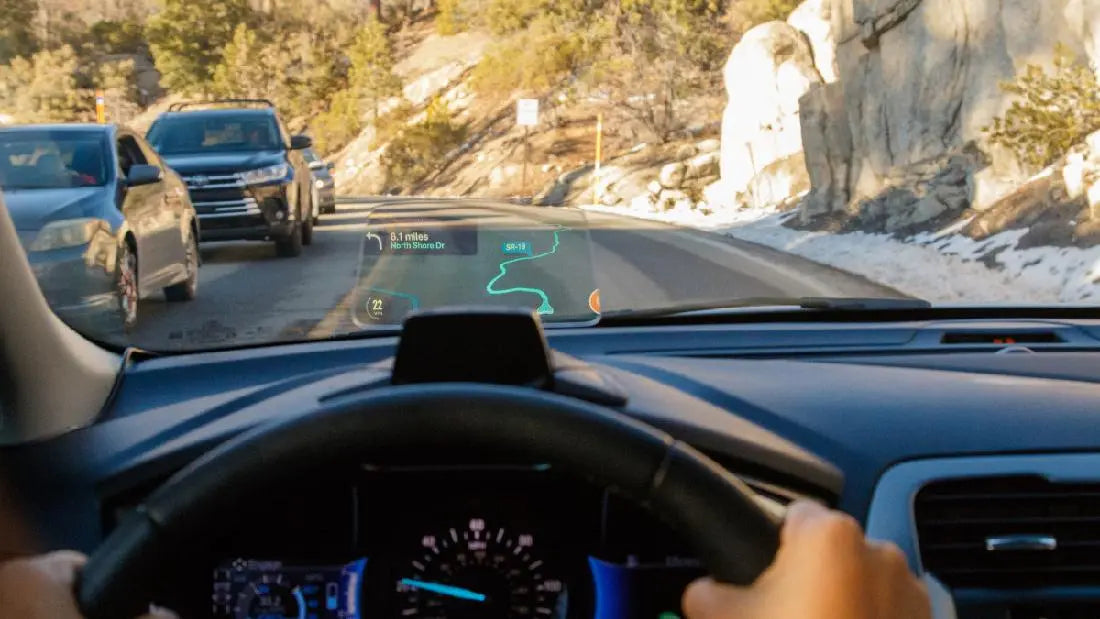
A head-up display (HUD) can put selected driving information closer to the forward view, helping some drivers check speed or directions with fewer downward glances. The benefit depends on the vehicle, display design, and setup; a HUD does not replace attention, mirrors, instruments, or driver assistance systems.
- Use a HUD for brief checks of essential information, not continuous viewing.
- Keep brightness and position comfortable in daylight and at night.
- Confirm which features your vehicle actually supports before relying on navigation or alerts.
The basics of HUD technology
A HUD uses optics to present information in a driver’s forward field of view. Some project onto the windshield; others use a separate transparent screen. Speed is common, while navigation, range, and warnings depend on the vehicle and its connected systems.

Enhanced visibility and awareness
Moving a quick speed check closer to the road scene may reduce the need to look down at a cluster. That does not mean the driver never looks away or reacts faster in every situation. The display itself can draw attention if it is too bright or crowded.
Spatial awareness and visibility
A HUD does not expand peripheral vision or improve distance judgment by itself. Its practical role is to present selected data without requiring as large a change in gaze direction. Drivers should still scan intersections, mirrors, and the full road scene.

Nighttime and low light enhancements
At night, adjust brightness to the lowest readable level while parked. Reflections and glare can offset any convenience from a display. A HUD does not illuminate the road or substitute for headlights and unobstructed visibility.
Intuitive speedometer and gauges
Speed is often the most useful HUD item because it supports a short glance. Fuel economy, range, and power data are available only where the vehicle and HUD support them. Verify any aftermarket speed reading against the vehicle instruments.
Turn-by-turn navigation
Some integrated systems show turn prompts or lane guidance. The display may omit map detail, so drivers should review the route before moving and use voice guidance where helpful. Never follow a prompt that conflicts with signs, traffic controls, or road conditions.

Collision warnings
A HUD may display warnings generated by a separate driver assistance system. The HUD does not detect hazards. Sensor availability, warning timing, and display behavior vary; drivers remain responsible for braking and steering.
Customization and personalization
Where supported, limit the display to information you can read quickly. Set position and brightness while parked, then confirm it does not obstruct the road view.
Choosing and setting up a HUD
| Check | Why it matters | What to verify |
|---|---|---|
| Display surface | Windshield and combiner designs behave differently | Mounting, reflections, and clear road view |
| Data source | Available data varies by system | Supported vehicle and displayed functions |
| Day and night readability | Glare or low contrast can distract | Brightness adjustment in real conditions |
| Warning features | A display is not a hazard sensor | Which separate assistance systems provide alerts |
Technician tip: Before driving, compare the HUD speed with the instrument cluster and check that the display remains readable without covering the forward view.
Safety reminder: Change settings only while parked. If the display is distracting, dim it or turn it off.
Frequently asked questions
Q1. How can a HUD support driver awareness?
A1. A HUD can place selected information near the forward view, which may reduce some downward glances. Drivers still need to scan the road, mirrors, and instrument cluster.
Q2. Does a HUD make driving safer?
A2. A HUD alone does not guarantee safer driving or prevent crashes. Its value depends on display design, placement, visibility, and how the driver uses it.
Q3. Can a HUD replace the instrument cluster?
A3. No. The instrument cluster remains the primary place to confirm vehicle status, and some information may not appear on the HUD.
Q4. Does every HUD project onto the windshield?
A4. No. Some systems project onto the windshield, while others use a separate combiner screen or another display surface.
Q5. Will a HUD improve night driving?
A5. A properly adjusted display may make selected information easier to glance at, but excessive brightness, reflections, or poor contrast can make night driving harder.
Q6. Can a HUD show navigation directions?
A6. Some systems can show turn prompts or lane guidance, but the available information depends on the vehicle, navigation source, and HUD configuration.
Q7. Does a HUD detect pedestrians or prevent collisions?
A7. No. A HUD is a display. Pedestrian detection and collision warnings require separate sensors and driver assistance systems, if the vehicle has them.
Q8. Can an aftermarket HUD work in any car?
A8. Compatibility varies by power source, data connection, dashboard shape, windshield, and vehicle electronics. Check the device specifications and vehicle documentation before buying.
Q9. What should I check before using a HUD?
A9. Set brightness and position while parked, confirm the display is readable without blocking the road, and verify that the shown speed and alerts match the vehicle information.
Q10. Can a HUD cause distraction?
A10. Yes. A crowded, bright, or poorly positioned display can compete for attention. Keep only useful information visible and avoid adjusting settings while driving.
Conclusion
A well configured HUD can make selected information easier to check, but its value comes from clear, limited content and sensible use. It is one part of an attentive driving routine.
For context on distraction, see the NHTSA overview of distracted driving.

Steven Chen
Automotive Performance Specialist | Engine & Exhaust Systems
Steven focuses on practical engine performance, exhaust fitment, and real-world upgrade paths for classic and modern enthusiast vehicles. He reviews small-block Ford, LS, truck, and street/strip applications with one goal in mind: helping builders choose parts that actually work together. His philosophy: "Good power starts with the right combination, not the biggest part."